
App features
Convert at your exchange office's rate
Banks and exchange offices don't use the market rate. Set yours and see right away how much you'll get.
Get it on Google Play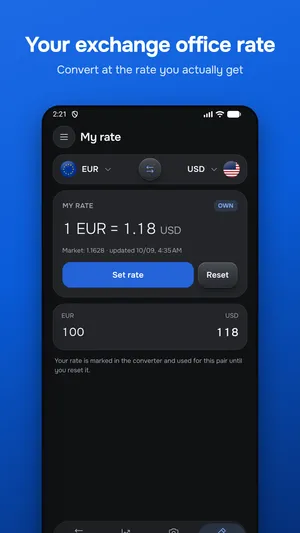
Set the rate
On the My rate tab pick a pair and enter the exchange office or bank rate.
The converter uses it
Rows with your rate are marked and convert at it — both ways.
Compare with the market
The market rate is shown next to it, so you see how good the offer is.
FAQ
Where do I get the exchange office rate?
From the exchange board or your bank app — one number is enough: how much you get for 1 unit of the currency.
How do I go back to the market rate?
Tap Reset on the My rate tab and the converter uses the mid-market rate again.
Is it free?
Your own rate is free with limits; PRO has no limits.
App features
- Currency converter for price tagsPoint the camera at a price tag, menu or receipt and see prices in your currency right over the frame.
- Offline currency converterThe latest rates are saved on your phone, so the converter works on a plane, in roaming and anywhere without signal.
- Currency widgets for your home screenConvert and keep an eye on rates without opening the app.
Take the converter with you
The app works without internet, scans price tags with the camera and lives on your home screen as a widget.
Get it on Google Play